Overview - User Site
This will give you a quick overview of the user site.
Overview
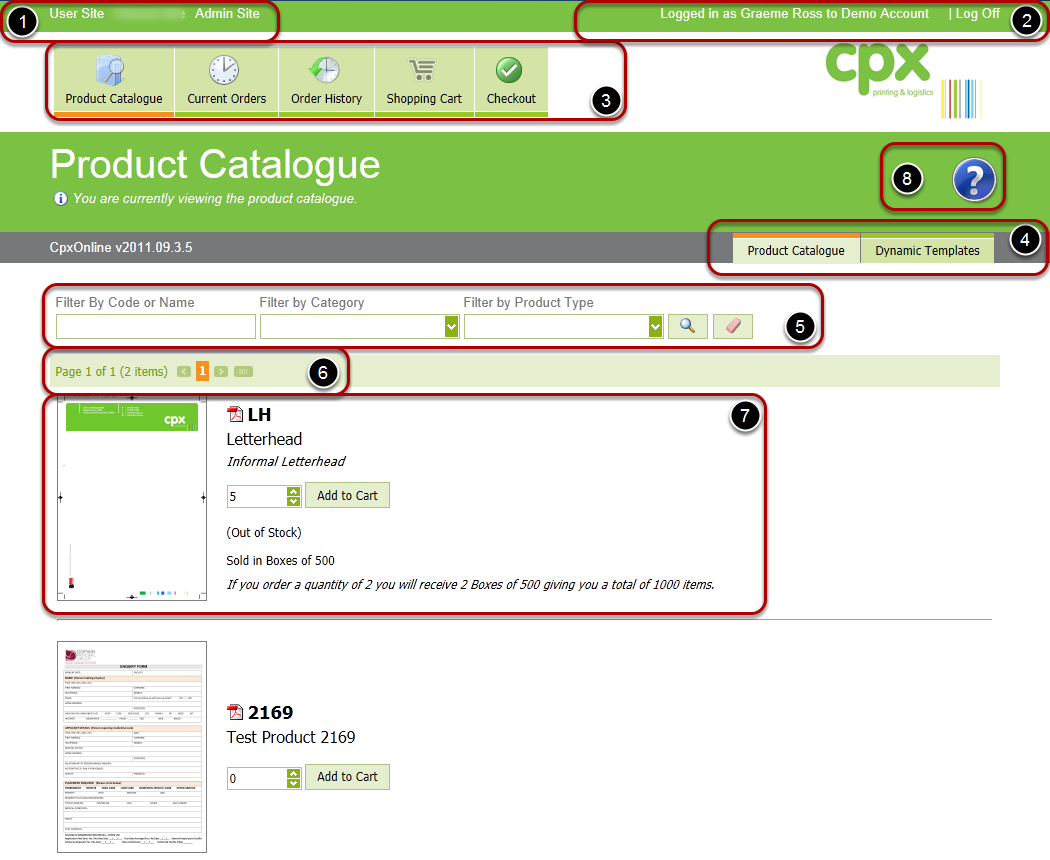
1 - Global Links

Depending on your permissions you may have access to both the User Site & Admin Site, to switch between the two sites you can use these links.
- User Site
- Admin Site

3 - Main Menu

- Opens the Product Catalogue
- Displays a list of your orders that are in progress.
- Displays a list of your completed orders.
- Displays your current shopping cart.
- Begins the Checkout procedure.
4 - Page Tabs

This are will allow you to switch between the different types of Product Catalogue.
- This tab is for ordering standard inventory items.
- This tab is for ordering personalised stationary.
5 - Product Catalogue - Searching

This area will allow you to quickly find a product or type of product.
6 - Product Catalogue - Navigation

By default the Product Catalogue will only display 10 items per page, as your catalogue grows you can use these buttons to navigate to other pages. As your catalogue grows large we recommend you use the searching options to locate your products.
7 - Product Catalogue - Item
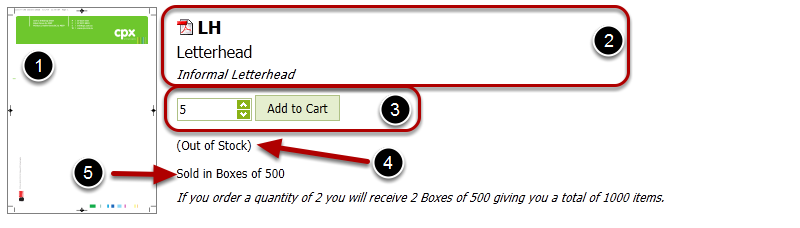
- Product Thumbnail - you can click this thumbnail to view a PDf of the product
- This area displays the information about the product (code, name, version & description)
- This are will allow you to add & remove a quantity from your shopping cart.
- Displays the available balance of the product.
- Displays information about the pack size of the product.